You spent hours crafting a new page or new blog that’s on brand and checks off the entire SEO checklist only to find out that Google Search Console isn’t discovering, crawling, or indexing the page…after days or weeks!
How to get Google Search Console to index a new page or new blog that is only discovered or only crawled? Well there has to be a clear connection, and by connection I meant a link, between the new page or new blog and a relevant page or blog that is already published and indexed.
Below is a diagram that shows a possible pathway for this new page or new blog to gain a clear piece of credibility or authority from a page that Google trusts and has already indexed.
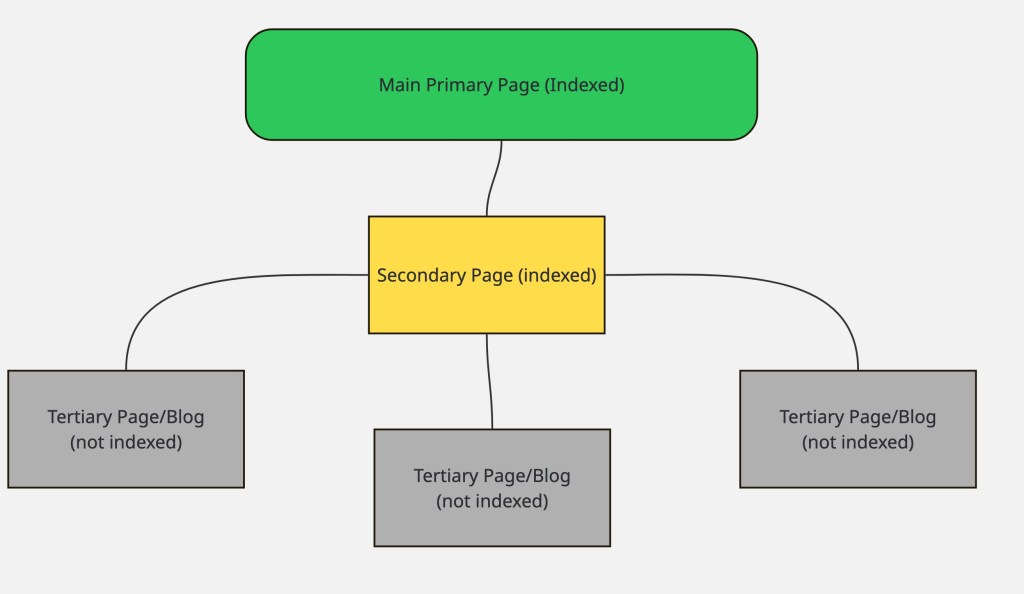
Now if there isn’t a natural way to link the new page or new blog from the existing trusted indexed pages, you should consider revising the new content to make sure it serves a clear purpose in supporting and diving deeper into a specific topic from the referring upper page.
After ensuring the new page or new blog content is relevant, go ahead and add relevant sections to the upper level pages so you can link to this new page. i advise finding at least 2 indexed pages where you can feature the topic of the new page or new blog with additional content and link back to the new page.
Finally, head over to Google Search Console and request google to index the URL of the new page or new blog.
Monitor the URL index status for a few days to see when the page gets indexed.
I have applied this internal linking approach to clearly map the page connections to couple of new pages that weren’t getting indexed and within.
This method works when the new page or new blog follow the same templates as the older indexed pages and blogs.
If you made drastic changes to the technical or technical components of the new page or new blog, then you will also need to inspect those aspects in Google Search Console.
 Web Tech Cafe